Healthy Roster
- 3.3
- Rating
- 100.00K
- Installs
- Free
- Price

 Analysis by App-foxy
When I first opened Healthy Roster, I understood its purpose quickly: this is a medical app built around the day-to-day work of athletic trainers, especially the documentation and communication that surround an athlete’s care. It is not trying to be a general fitness tracker or a replacement for a hospital record system. Its value is more practical. It gives a trainer a mobile place to keep care-related information organized and easier to communicate.
That focus makes it most interesting for schools, sports programs, teams, and athletic departments where treatment notes and updates can otherwise become scattered across paper, text messages, email, and memory. I would not recommend it simply because someone wants to monitor personal exercise. The app makes more sense when several people need a clearer view of an athlete’s progress and the athletic trainer is the person coordinating that information.
Healthy Roster is free, aimed at Everyone, and developed by Healthy Roster, LLC. It has been available since October 19, 2015, and its current version is 6.61.1. The app has passed the one-hundred-thousand-install mark, while its average sits at about 3.3 from roughly ninety ratings and around thirty written reviews. Those figures suggest a real user base, but also tell me to approach it as a specialized tool that may suit some workflows much better than others.
You May Also Like

 Google Keep - Notes and lists
Google Keep’s Quiet Growth Shows the Appeal of Simpler Notes
As mobile work gets busier, Google Keep keeps winning a simple contest: capture a thought quickly, find it later, and get on with the day.

 Blood Strike: 2.5 Anniversary
Blood Strike’s Loadouts Turn Every Drop Into a Tactical Gamble
A close look at Blood Strike’s custom loadouts: how fast access to signature weapons reshapes its battle royale rhythm, rewards preparation, and narrows the gap between fights.

 Pandora - Music & Podcasts
Pandora’s Music Is Easy to Start, but Harder to Recover
Pandora’s strength is its low-effort path from a seed to a station. Its weak spot is how much confidence it asks you to place in connection, setup, and quiet recovery.

 8 Ball Pool
 Is Built on Rivalries, Rematches, and Routine
A close look at the rivalries, rematches, shared routines, and unanswered safety questions that turn a quick pool match into a persistent mobile community.

 Samsung Music
’s Quiet Strength Is Playing What You Already Own
Its reach comes less from spectacle than from dependable access to a personal library. That simplicity is both the app’s strongest retention engine and its ceiling.

 AccuWeather: Weather Radar
AccuWeather Review: A Quick, Clear Forecast for Everyday Decisions
For everyday plans, the best forecast is the one you can understand quickly. AccuWeather makes rain timing, radar, and local conditions easy to act on, with a few trade-offs.
More From Our News Desk



What to expect before you begin
The first thing to understand is that the app’s strength depends on how a sports organization already handles care. A mobile documentation tool can save time when a trainer needs to record an encounter soon after it happens, communicate an update, or keep a running history that is easier to revisit than loose notes. It is less compelling if you are looking for workout plans, nutrition guidance, symptom education, or a consumer-facing health dashboard.
I would think of it as a shared working space for athletic-care information rather than a medical encyclopedia. That distinction matters because it sets the right expectations. You are not opening it to browse articles or receive a stream of generic wellness advice. You are opening it because a trainer needs a consistent way to document what happened and keep the relevant people informed.
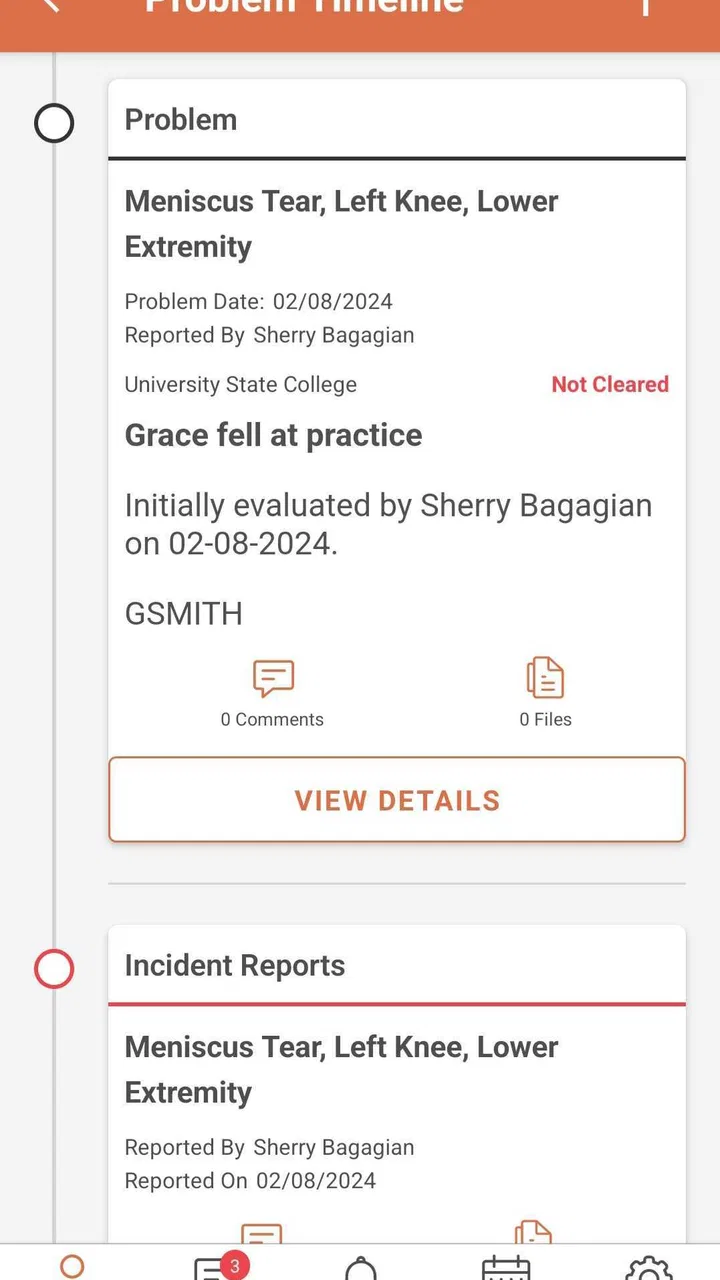
A realistic example is a school athlete who reports discomfort after practice. Instead of writing a quick note on paper and trying to remember which coach needs an update, the trainer can use the mobile workflow to keep the encounter connected to the athlete’s ongoing record. The benefit is not dramatic automation; it is reducing small gaps between observation, documentation, and communication.
That kind of benefit is easy to underestimate. In sports medicine, the problem is often not a lack of information but information living in too many places. A dedicated app can make the trainer’s routine more deliberate. It can also make later conversations easier because the record is not dependent entirely on recollection.
At the same time, I would not treat a phone app as a substitute for professional judgment. The person using it still has to decide what should be recorded, what needs immediate attention, and who should receive an update. Healthy Roster can support that process, but it does not turn an unstructured situation into a clinical decision automatically.
Who will get the most from it
The clearest audience is an athletic trainer who works with multiple athletes and needs mobile documentation close to the field, court, or training room. It can also make sense for an organization that wants a more consistent communication habit instead of leaving every trainer or coach to invent a separate method.
For a first-time user, I would ask one practical question before installing it: Do I need to document and communicate athletic care, or am I searching for general health features? If the answer is the former, the app deserves a closer look. If the answer is the latter, its specialized design may feel narrow rather than useful.
What makes the mobile approach worthwhile
The main advantage is timing. Notes made close to the event are usually easier to keep accurate than notes reconstructed at the end of a busy day. A mobile workflow also fits the reality of athletic training, where the person responsible for care may move between locations rather than sit at a desk.
There is a second advantage that is less obvious: consistency. Even a simple digital routine can encourage a trainer to capture the same basic kind of information each time. That does not guarantee complete documentation, but it reduces the temptation to rely on informal messages alone.
The trade-off is that a mobile interface can feel slower than a quick handwritten reminder when the situation is hectic. The app is most useful when the organization commits to using it as the normal record, not when staff members switch between it and several unrelated systems without a clear rule.
Setting up a useful starting point
For a first-time user, I would begin with a clear purpose rather than tapping through the app without a plan. Decide whether the first goal is documenting an encounter, reviewing an athlete’s information, or communicating an update. That small decision gives the setup a destination and makes it easier to recognize when the app has begun providing value.
Keep the first session focused. Instead of trying to understand every part of the product immediately, I would establish the working context that matters to the trainer: the relevant organization or team environment, the athletes who need attention, and the people who need to stay informed. The exact screens may vary with the account and role, but the principle is the same: start with the smallest useful group.
This is one of the most important workflow tips I can offer. A digital record becomes difficult to trust when the starting structure is vague. If a trainer is responsible for several teams, it is worth thinking about how those groups should be separated before entering a large amount of information. Good organization at the beginning makes later searching and communication less frustrating.
I would also avoid treating setup as a one-time administrative chore. The app’s usefulness depends on keeping the working context current. When staff responsibilities change or an athlete’s situation changes, the surrounding information should be reviewed rather than assumed to remain correct forever.
Making the first session less intimidating
First-time users often worry that they need to understand the entire system before they can use it safely. My experience with specialized apps is that this approach creates unnecessary friction. Healthy Roster is easier to evaluate through one complete, modest task than through a tour of every available area.
Choose one real but uncomplicated example. It might be a recent care interaction that is already clear in your mind. Use that example to learn where the athlete record is found, where documentation belongs, and how an update is handled. Once that path makes sense, repeat it with another case. This is more reassuring than filling the app with test information that later has to be removed or ignored.
Another useful habit is to agree on naming and communication conventions with the rest of the staff. If one person writes detailed updates and another uses vague shorthand, the app cannot solve the resulting confusion. The technology works best when the team decides what a useful note looks like and when an update should be shared.
I would also make sure the first meaningful action is completed during a calm period rather than in the middle of a crowded event. That gives the trainer time to notice where the workflow feels natural and where it demands extra taps or attention. Discovering those friction points early is much better than discovering them while several athletes are waiting.
The first successful action
The best first success is not merely opening a profile. It is completing a small documentation-and-communication loop. Start with an athlete you are authorized to manage, record a straightforward interaction, review what you entered, and then confirm that the intended update is represented clearly for the people who need it.
I like this approach because it tests the app against the real reason an athletic trainer would use it. A profile that looks organized is helpful, but the real question is whether the app supports the movement from care event to usable record. If that loop feels understandable, the product has earned a place in the daily workflow.
Before considering the task finished, read the entry as if you were another staff member seeing it later. Would the timing and situation be clear? Would the next person understand why the note matters? Would the update create a useful handoff rather than another vague message? This review step is a non-obvious but valuable safeguard, especially when documentation is being completed quickly.
A second tip is to separate documentation from casual conversation. If a coach needs a short operational update, that does not necessarily mean the entire clinical detail should be repeated in an informal channel. Use the app’s intended record and communication flow thoughtfully, keeping the message appropriate to the recipient and the purpose.
The first completed loop also helps answer whether the app is a good fit for the organization. If the trainer can finish it without constantly translating between Healthy Roster and another record system, the mobile approach may reduce duplication. If every action requires copying information elsewhere, the convenience becomes much smaller.
Common confusion and everyday friction
The most likely confusion is expecting the app to behave like a general patient portal. Its center of gravity is athletic training documentation and communication, so someone searching for broad medical resources may not find the experience satisfying. That is not necessarily a defect, but it is a reason to choose the app for the work it is designed to support.
Another point of friction is role and audience. A trainer, coach, athlete, and family member may not need the same information or use the app in the same way. Before sharing an update, I would pause and ask who needs the information and what level of detail is appropriate. A communication tool can improve coordination, but careless communication can still create noise.
There is also a difference between recording an event and managing the entire care process. Healthy Roster may help keep documentation and updates together, but the trainer remains responsible for interpreting the situation and deciding what happens next. I would not use the presence of a digital record as proof that follow-up has been completed.
Busy environments create another practical challenge. When a trainer is moving quickly, the temptation is to postpone every note until later. That weakens one of the app’s strongest advantages. A better routine is to capture the essential information as soon as the situation allows, then return for fuller detail when appropriate. The exact balance will depend on the organization’s procedures, but the principle is to avoid turning mobile documentation into a delayed memory exercise.
Some users may also find that a specialized app requires a change in habits before it feels faster than familiar alternatives. Paper can seem quicker for a single note, and ordinary messaging can seem quicker for a single update. Healthy Roster becomes more convincing when the comparison includes the later need to find, understand, and connect those pieces of information.
How it compares with familiar alternatives
Paper notes have the advantage of immediate simplicity. They need no learning curve and can be written almost anywhere. Their weakness appears later, when a trainer needs to locate an older entry, share a consistent update, or make sure the record stays available to the right people. Healthy Roster offers a more organized digital path, but asks the user to follow that path consistently.
Text messaging is fast for urgent coordination, yet it is a poor long-term home for structured documentation. Messages can become mixed with unrelated conversations, and their context may be difficult to reconstruct. The app is a better fit when the goal is to keep athletic-care information connected to the athlete rather than scattered among individual phones.
A broad electronic medical record may provide deeper clinical tools and wider healthcare integration, depending on the organization. That kind of system may be preferable for a hospital or clinic with complex requirements. Healthy Roster is more appealing when the immediate need is athletic-trainer documentation and communication in a mobile sports setting, without forcing every routine interaction into a larger clinical platform.
Spreadsheets can be flexible, but flexibility often shifts the burden onto the person designing and maintaining them. A spreadsheet may work for a small, disciplined group, yet it does not automatically create a care-centered workflow. Healthy Roster’s advantage is its specific purpose; its limitation is that it may not cover every administrative or clinical need outside that purpose.
Who should skip it
I would skip this app if you are an individual looking for a personal symptom tracker, workout planner, or everyday wellness companion. Its athletic-trainer orientation is too specific for those goals. I would also hesitate if your organization has already invested in a larger medical record system and has no intention of changing how documentation is stored or shared.
It may not be the right choice for a team that refuses to establish a common workflow. No documentation app can compensate for unclear responsibility, inconsistent terminology, or uncertainty about who should receive updates. In that situation, the organization may need to fix its process first and evaluate software afterward.
On the other hand, I would recommend testing it for a trainer who spends much of the day away from a desk and needs a more dependable alternative to paper and scattered messages. The free price lowers the barrier to trying it, while the Everyone content rating makes it broadly approachable from an age-classification standpoint. The real decision is not the download; it is whether the team will use the app as a shared habit.
The next step after the first success
Once the first documentation loop works, expand gradually. Add another realistic case, compare how easy it is to review both records, and ask whether the communication remains clear when more than one person is involved. This small-scale test reveals more than a quick installation because it exposes the organizational cost of using the app.
I would then create a simple internal routine: document close to the care event when practical, review entries before relying on them, and use the communication pathway for updates that others genuinely need. The goal is not to fill the system with activity. The goal is to make each entry useful to the next person who has to understand the athlete’s situation.
It is also worth revisiting the workflow after a week or two of ordinary use. Look for repeated points where staff members hesitate, duplicate information, or leave notes unfinished. Those patterns are more valuable than first impressions. They show whether the app is saving effort or merely moving the same effort to a different screen.
Because the app has been around for years and continues in version 6.61.1, I see it as an established option rather than a brand-new experiment. Still, the modest average rating of about 3.3 reminds me that a specialized tool will not feel equally smooth for everyone. Before making it central to a large program, I would run a small trial with the people who will actually document and communicate through it.
My final view is positive but specific. Healthy Roster is worth considering when an athletic trainer needs mobile documentation tied to communication and wants to move away from disconnected paper notes, texts, and spreadsheets. Its best result is a calmer handoff: one person records what happened, another can understand the update, and the organization has a more dependable working history.
The first meaningful success is simple: complete one accurate record and one clear update without leaving the app to reconstruct the story elsewhere. If that process fits your team, the app can become a practical part of daily athletic care. If your needs are personal wellness, broad clinical management, or a completely different medical workflow, choosing a more general or more comprehensive alternative would be the wiser decision.
FAQs for Healthy Roster
01What is Healthy Roster and who is it designed for?
Healthy Roster is a digital platform for managing sports medicine and athlete health information. It is commonly used by schools, sports teams, athletic trainers, clinics, and families to organize injury documentation, treatment updates, forms, and communication. Before downloading it, remember that the features available to you may depend on whether your school, team, employer, or healthcare provider has invited you to use the service.
02How does Healthy Roster help athletes, parents, and medical staff?
The app brings important health and injury-related information into one place. Athletes and parents may be able to complete forms, review updates, communicate with authorized staff, and follow return-to-play instructions. Athletic trainers and healthcare professionals can use it to document evaluations, treatments, rehabilitation progress, and participation status. The exact tools and permissions vary according to the organization managing your account.
03Is Healthy Roster free to download and use?
Healthy Roster may be available to download without an upfront charge, but access to its services is generally connected to an organization, healthcare provider, school, or sports program. Some users may need an invitation, registration code, or verified account before they can use the main features. It is a good idea to confirm with your team or provider whether any separate service fees, subscriptions, or account requirements apply.
04Does Healthy Roster protect personal and medical information?
Because Healthy Roster can contain sensitive health, injury, and contact information, privacy and account security are important considerations. The platform is intended to provide controlled access for participating organizations and authorized users, but you should still review its current privacy policy and permissions before creating an account. Use a strong password, avoid sharing login details, and check who can view information submitted through the app.
05Can Healthy Roster replace a doctor or be used for emergencies?
No. Healthy Roster is a communication, documentation, and organization tool rather than a replacement for professional medical care. Information displayed in the app should not be treated as an emergency diagnosis or as permission to ignore worsening symptoms. If an athlete experiences a serious injury, breathing difficulty, loss of consciousness, severe pain, or another urgent problem, contact emergency services or seek immediate medical attention instead of relying only on the application.
Pros
- Centralizes medical records
- forms
- and care information in one place.
- Makes it easier to share updates with coaches
- parents
- and medical staff.
- Supports injury documentation with photos
- notes
- and status updates.
- Can reduce paperwork and improve communication during an athlete’s recovery.
- Useful for organizations managing multiple athletes and return-to-play details.
Cons
- Some features may depend on an organization’s subscription or account setup.
- The app is less useful for individuals without a participating sports program.
- Uploading detailed medical information raises privacy and security concerns.
- Notifications and updates may be inconsistent if staff do not maintain records.
- The interface can feel complex for users unfamiliar with digital health platforms.

Healthy Roster
Gallery